> ## Documentation Index
> Fetch the complete documentation index at: https://docs.cernel.com/llms.txt
> Use this file to discover all available pages before exploring further.
# Public API
> Push product data directly to Cernel via REST API and receive real-time webhook notifications.
The Public API lets you programmatically push product data to Cernel and receive notifications when content is generated or products are updated. Use it for custom integrations, automated pipelines, or any workflow that needs to interact with Cernel beyond the standard integrations.
## How it works
After creating an API integration, you receive an API token that authenticates your requests. Push product data to Cernel's REST endpoints, and your products appear in the Catalog ready for enrichment. Configure webhooks to receive real-time notifications when enrichment completes or products change.
### Why you would use this
Connect Cernel to any system that can make HTTP requests - your ERP, PIM, custom tools, or internal workflows.
Webhooks notify your systems when AI generates new content or products are updated, enabling automated downstream workflows.
## Setting up the API integration
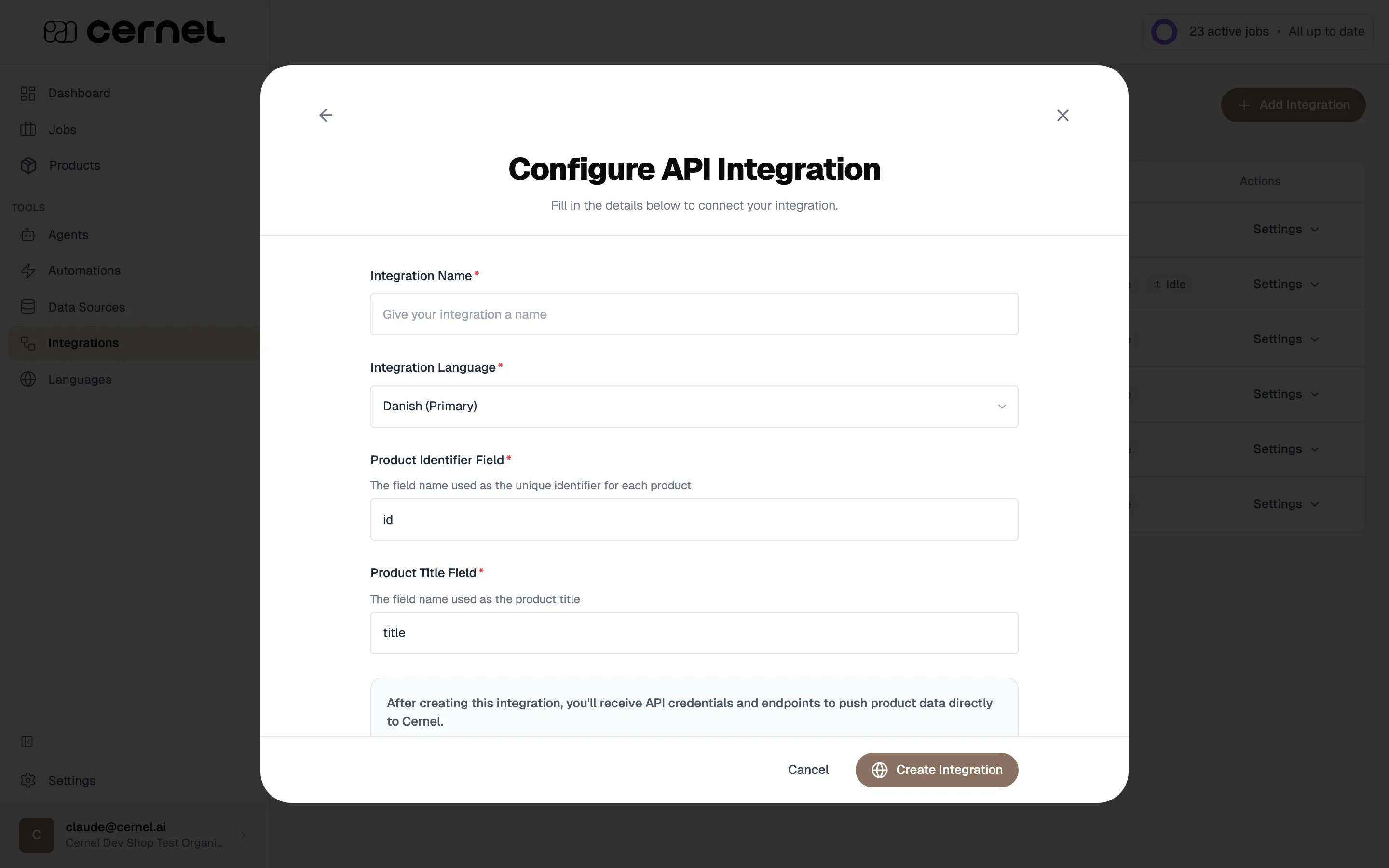
Go to **Tools > Integrations**, click **Add Integration**, and select **API Integration**.
Configure the basics:
* **Integration Name** - A descriptive name
* **Integration Languages** - The languages this integration pushes and pulls product data in. You can pick one language or several: the first one you add is marked **Primary** and is used as the fallback when a property is pushed without a language. Open **Edit Languages** later from the integration detail panel to change the list.
* **Product Identifier Field** - The field name used as the unique identifier (e.g., `id`, `sku`)
* **Product Title Field** - The field name used as the product title (e.g., `title`, `name`)
 Properties you push can carry a `locale` field: Cernel stores each localized value separately and surfaces it for the matching language. Properties pushed without a `locale` are stored against the integration's primary language.
After creating the integration, go to **Settings > API**. Your API token is displayed here. Use the copy button to copy it to your clipboard.
Properties you push can carry a `locale` field: Cernel stores each localized value separately and surfaces it for the matching language. Properties pushed without a `locale` are stored against the integration's primary language.
After creating the integration, go to **Settings > API**. Your API token is displayed here. Use the copy button to copy it to your clipboard.
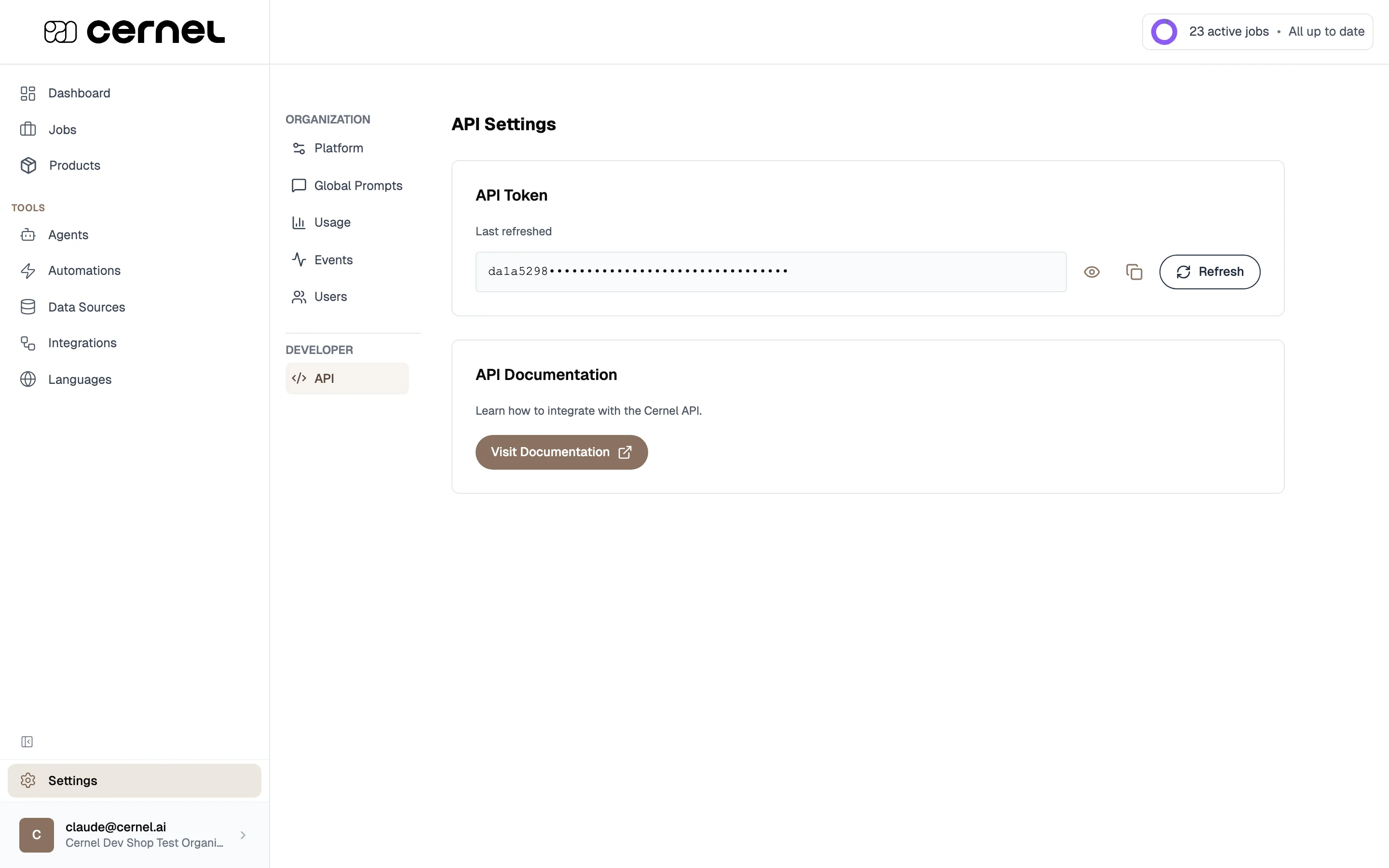 Keep your API token secure. Anyone with the token can push data to your Cernel organization. If you need to rotate the token, click **New key** - the old token is immediately invalidated.
Click **Visit Documentation** or go directly to the [API Reference](https://api.platform.cernel.com/api/v1/docs) to open the full API documentation. This covers all available endpoints, request formats, authentication, and response schemas.
Your API integration is ready. Use your token to authenticate requests and start pushing product data to Cernel.
## Configuring webhooks
Webhooks notify your systems when events occur in Cernel. Configure them in **Settings > Webhooks**.
### Available webhook types
| Webhook | Trigger | Use case |
| -------------------- | -------------------------------------------------- | ------------------------------------------------------ |
| **Attribute Result** | When an attribute value is generated for a product | Sync enriched content to external systems in real-time |
| **Product Created** | When a new product is created in Cernel | Trigger downstream workflows when products arrive |
| **Product Updated** | When a product is updated | Keep external systems in sync with product changes |
For each webhook type, enter the URL where Cernel should send POST requests when the event occurs.
Click the **Test** button (lightning bolt icon) to send a test POST request to your webhook URL. Cernel reports whether the test was successful or failed.
Your webhook is configured. Cernel sends POST requests to your URL whenever the configured event occurs.
## Building a custom product pipeline
If your products come from an ERP, PIM, custom database, or supplier feed, you can build a fully automated pipeline: push products in via the API, enrich them with AI using [Automations](/features/automations), and get the results back programmatically.
```
Your System → API (create products) → Cernel → Automation → AI Enrichment
↓
Your System ← Webhook / Changes API ← Enriched Content ← Review & Approve
```
### Pushing products
Use the create products endpoint to push product data from your system:
```
POST /api/v1/integrations:api/{integration_id}/products
```
You can send up to 100 products per request. Products are matched by their identifier field; if a product with the same ID already exists, it's updated instead of duplicated.
### Patching products (partial updates)
Use the patch endpoint when you only need to change a few properties on a product, without re-pushing the full payload:
```
PATCH /api/v1/integrations:api/{integration_id}/products
```
The patch endpoint accepts an array of operations. Each operation locates a product either by `product_id` (Cernel's ID) **or** by `identifier` (your system's identifier, exactly one of the two), then sets, removes, or appends localized property values. Each item in the batch is applied as its own transaction, so a bad operation only fails that one item, not the whole batch.
Use this when you want to update a single field (e.g., a price change) on thousands of products without re-sending every property you've already pushed.
### Listing products
Use the list products endpoint to fetch products that already exist on the integration, with filters:
```
GET /api/v1/integrations:api/{integration_id}/products
```
You can filter by identifier (useful for looking up whether a product is already in Cernel before deciding whether to create or patch) and optionally include child products in the response.
### Getting enriched data back
**Option A: Webhooks (real-time)**
Set up webhooks in **Settings > Webhooks** to receive notifications when attribute values are generated, products are updated, or new products are created. Cernel sends a POST request to your webhook URL with the event data.
**Option B: Changes endpoint (polling)**
Poll the changes endpoint to get a chronological list of enrichment updates:
```
GET /api/v1/integrations:api/{integration_id}/changes
```
Use the cursor-based pagination to track where you left off. Each response includes an offset you pass to the next request.
Webhooks are better for real-time workflows. The changes endpoint is better for batch processing or when you want to pull data on a schedule (e.g., a nightly sync).
### Tracking product completeness
When you poll the changes endpoint, add `include_summary=true` to attach a per-product **completeness summary** to each change. It answers "how far along is this product?" without a separate lookup:
```
GET /api/v1/integrations:api/{integration_id}/changes?include_summary=true
```
Each change then carries a `summary` object with:
* `num_attributes`: every attribute attached to the product's category in Cernel, including ones this integration has no mapping for.
* `num_attributes_with_agents`: how many of those attributes an AI agent can fill. The rest are only ever set by an upsert or a manual edit.
* `locale_summaries`: a `num_attributes_populated` count per locale, covering every language enabled on your organization. A language with nothing filled in yet reports zero rather than being absent. The attribute totals are the same for every locale, so the per-locale counts share one denominator and are directly comparable.
The summary describes the product as Cernel holds it, matching what you see in the dashboard. It is `null` for a product that has no category in the taxonomy, since there is then no attribute set to measure against.
`include_summary` reads each product's values across every locale, so it is heavier than a plain change poll and is off by default. Unlike `include_all_properties`, it does not lower the maximum `limit`, so you can keep polling at full page size.
### Example: ERP to Cernel to e-commerce platform
1. **Nightly export** from your ERP pushes new/updated products to Cernel via API
2. **Automation** enriches each product with descriptions, meta content, and materials
3. **Morning review:** your content team reviews results on the Dashboard and approves
4. **Changes endpoint:** your e-commerce platform polls for approved changes and publishes them
### Managing the product lifecycle
You have two options:
* **Full update**: push the complete product payload to `POST /products`. The identifier field matches against existing products; Cernel replaces the property values you send.
* **Partial update**: send a `PATCH /products` operation that only includes the properties you want to change. Locate the product by `product_id` or `identifier` (exactly one of the two), then set, remove, or append localized values. Each operation runs in its own transaction, so a single failure doesn't roll back the batch.
Updated product data can re-trigger automations if the product matches automation criteria.
When you change how a property is mapped, adjust an agent, or update an attribute, the products already in your integration keep their current values until they're processed again. To re-run your current property mappings across every product in the integration, without re-sending them through the API:
1. Open the integration from **Integrations** and click the **Settings** menu near the top of the detail page.
2. Choose **Reset Integration**.
3. Select **Reapply mappings** and confirm.
Reapplying mappings re-runs the current property mappings on your existing products. It's faster than a full restart because no source data is re-ingested: Cernel simply re-processes the products it already holds.
The other reset option, **Restart from scratch**, re-imports all products from an integration's source. API integrations receive products directly rather than importing from a source, so that option doesn't apply to them. Reapplying mappings is the equivalent operation for an API-driven catalog.
An API integration can be configured for any number of languages; see [Setting up the API integration](#setting-up-the-api-integration) for the **Integration Languages** picker.
When you push or patch product properties, each property can carry a `locale` field. Cernel stores each localized variant separately and exposes the matching language to enrichment, the product UI, and the `/changes` endpoint. Properties pushed without a `locale` are stored against the integration's **Primary** language.
This lets one API integration cover, for example, a Danish reference catalog with English and German translations alongside it, without setting up separate integrations per language.
Use the delete endpoint to remove products:
```
DELETE /api/v1/integrations:api/{integration_id}/products/{product_id}/delete
```
You can choose to fully delete the product or just unlink it from the integration while keeping it in Cernel.
The changes endpoint returns enrichment updates in chronological order. Use it to build an audit trail or sync enriched content to downstream systems.
Pass `include_all_properties=true` to get the full product snapshot with each change (useful for full syncs, but limited to 10 results per request). Pass `include_summary=true` to attach a completeness summary (attributes defined, AI-fillable, and populated per locale) to each change without lowering the page size. See [Tracking product completeness](#tracking-product-completeness).
## Frequently asked questions
The full API reference is available at [api.platform.cernel.com/api/v1/docs](https://api.platform.cernel.com/api/v1/docs), also accessible from the **API Docs** tab at the top of this site or from **Settings > Developer > API** in the app. It covers all endpoints, authentication, request/response formats, and error codes.
Go to **Settings > API** and click **New key**. A new token is generated immediately and the old one stops working. Update any systems using the old token.
Webhooks send JSON payloads via HTTP POST requests. The exact payload structure is documented in the API reference. Each webhook type includes the relevant product data and event details.
Each webhook type supports one URL. If you need to notify multiple systems, use your webhook endpoint as a relay that forwards to multiple destinations.
No. The API is for **product data and the enrichment pipeline**: pushing and updating products, polling for changes, receiving webhooks, and triggering enrichment through your automations. Configuration of **AI Agents, Data Sources, attributes, automations, and your taxonomy is done in the Cernel app**, not through the API. Set those up once in the platform, then let the API drive products through them.
## What's next
Browse the full API documentation: endpoints, schemas, authentication, and examples.
Once products are pushed via API, enrich them with AI-generated content.
Set up automations to automatically enrich products pushed via API.
Keep your API token secure. Anyone with the token can push data to your Cernel organization. If you need to rotate the token, click **New key** - the old token is immediately invalidated.
Click **Visit Documentation** or go directly to the [API Reference](https://api.platform.cernel.com/api/v1/docs) to open the full API documentation. This covers all available endpoints, request formats, authentication, and response schemas.
Your API integration is ready. Use your token to authenticate requests and start pushing product data to Cernel.
## Configuring webhooks
Webhooks notify your systems when events occur in Cernel. Configure them in **Settings > Webhooks**.
### Available webhook types
| Webhook | Trigger | Use case |
| -------------------- | -------------------------------------------------- | ------------------------------------------------------ |
| **Attribute Result** | When an attribute value is generated for a product | Sync enriched content to external systems in real-time |
| **Product Created** | When a new product is created in Cernel | Trigger downstream workflows when products arrive |
| **Product Updated** | When a product is updated | Keep external systems in sync with product changes |
For each webhook type, enter the URL where Cernel should send POST requests when the event occurs.
Click the **Test** button (lightning bolt icon) to send a test POST request to your webhook URL. Cernel reports whether the test was successful or failed.
Your webhook is configured. Cernel sends POST requests to your URL whenever the configured event occurs.
## Building a custom product pipeline
If your products come from an ERP, PIM, custom database, or supplier feed, you can build a fully automated pipeline: push products in via the API, enrich them with AI using [Automations](/features/automations), and get the results back programmatically.
```
Your System → API (create products) → Cernel → Automation → AI Enrichment
↓
Your System ← Webhook / Changes API ← Enriched Content ← Review & Approve
```
### Pushing products
Use the create products endpoint to push product data from your system:
```
POST /api/v1/integrations:api/{integration_id}/products
```
You can send up to 100 products per request. Products are matched by their identifier field; if a product with the same ID already exists, it's updated instead of duplicated.
### Patching products (partial updates)
Use the patch endpoint when you only need to change a few properties on a product, without re-pushing the full payload:
```
PATCH /api/v1/integrations:api/{integration_id}/products
```
The patch endpoint accepts an array of operations. Each operation locates a product either by `product_id` (Cernel's ID) **or** by `identifier` (your system's identifier, exactly one of the two), then sets, removes, or appends localized property values. Each item in the batch is applied as its own transaction, so a bad operation only fails that one item, not the whole batch.
Use this when you want to update a single field (e.g., a price change) on thousands of products without re-sending every property you've already pushed.
### Listing products
Use the list products endpoint to fetch products that already exist on the integration, with filters:
```
GET /api/v1/integrations:api/{integration_id}/products
```
You can filter by identifier (useful for looking up whether a product is already in Cernel before deciding whether to create or patch) and optionally include child products in the response.
### Getting enriched data back
**Option A: Webhooks (real-time)**
Set up webhooks in **Settings > Webhooks** to receive notifications when attribute values are generated, products are updated, or new products are created. Cernel sends a POST request to your webhook URL with the event data.
**Option B: Changes endpoint (polling)**
Poll the changes endpoint to get a chronological list of enrichment updates:
```
GET /api/v1/integrations:api/{integration_id}/changes
```
Use the cursor-based pagination to track where you left off. Each response includes an offset you pass to the next request.
Webhooks are better for real-time workflows. The changes endpoint is better for batch processing or when you want to pull data on a schedule (e.g., a nightly sync).
### Tracking product completeness
When you poll the changes endpoint, add `include_summary=true` to attach a per-product **completeness summary** to each change. It answers "how far along is this product?" without a separate lookup:
```
GET /api/v1/integrations:api/{integration_id}/changes?include_summary=true
```
Each change then carries a `summary` object with:
* `num_attributes`: every attribute attached to the product's category in Cernel, including ones this integration has no mapping for.
* `num_attributes_with_agents`: how many of those attributes an AI agent can fill. The rest are only ever set by an upsert or a manual edit.
* `locale_summaries`: a `num_attributes_populated` count per locale, covering every language enabled on your organization. A language with nothing filled in yet reports zero rather than being absent. The attribute totals are the same for every locale, so the per-locale counts share one denominator and are directly comparable.
The summary describes the product as Cernel holds it, matching what you see in the dashboard. It is `null` for a product that has no category in the taxonomy, since there is then no attribute set to measure against.
`include_summary` reads each product's values across every locale, so it is heavier than a plain change poll and is off by default. Unlike `include_all_properties`, it does not lower the maximum `limit`, so you can keep polling at full page size.
### Example: ERP to Cernel to e-commerce platform
1. **Nightly export** from your ERP pushes new/updated products to Cernel via API
2. **Automation** enriches each product with descriptions, meta content, and materials
3. **Morning review:** your content team reviews results on the Dashboard and approves
4. **Changes endpoint:** your e-commerce platform polls for approved changes and publishes them
### Managing the product lifecycle
You have two options:
* **Full update**: push the complete product payload to `POST /products`. The identifier field matches against existing products; Cernel replaces the property values you send.
* **Partial update**: send a `PATCH /products` operation that only includes the properties you want to change. Locate the product by `product_id` or `identifier` (exactly one of the two), then set, remove, or append localized values. Each operation runs in its own transaction, so a single failure doesn't roll back the batch.
Updated product data can re-trigger automations if the product matches automation criteria.
When you change how a property is mapped, adjust an agent, or update an attribute, the products already in your integration keep their current values until they're processed again. To re-run your current property mappings across every product in the integration, without re-sending them through the API:
1. Open the integration from **Integrations** and click the **Settings** menu near the top of the detail page.
2. Choose **Reset Integration**.
3. Select **Reapply mappings** and confirm.
Reapplying mappings re-runs the current property mappings on your existing products. It's faster than a full restart because no source data is re-ingested: Cernel simply re-processes the products it already holds.
The other reset option, **Restart from scratch**, re-imports all products from an integration's source. API integrations receive products directly rather than importing from a source, so that option doesn't apply to them. Reapplying mappings is the equivalent operation for an API-driven catalog.
An API integration can be configured for any number of languages; see [Setting up the API integration](#setting-up-the-api-integration) for the **Integration Languages** picker.
When you push or patch product properties, each property can carry a `locale` field. Cernel stores each localized variant separately and exposes the matching language to enrichment, the product UI, and the `/changes` endpoint. Properties pushed without a `locale` are stored against the integration's **Primary** language.
This lets one API integration cover, for example, a Danish reference catalog with English and German translations alongside it, without setting up separate integrations per language.
Use the delete endpoint to remove products:
```
DELETE /api/v1/integrations:api/{integration_id}/products/{product_id}/delete
```
You can choose to fully delete the product or just unlink it from the integration while keeping it in Cernel.
The changes endpoint returns enrichment updates in chronological order. Use it to build an audit trail or sync enriched content to downstream systems.
Pass `include_all_properties=true` to get the full product snapshot with each change (useful for full syncs, but limited to 10 results per request). Pass `include_summary=true` to attach a completeness summary (attributes defined, AI-fillable, and populated per locale) to each change without lowering the page size. See [Tracking product completeness](#tracking-product-completeness).
## Frequently asked questions
The full API reference is available at [api.platform.cernel.com/api/v1/docs](https://api.platform.cernel.com/api/v1/docs), also accessible from the **API Docs** tab at the top of this site or from **Settings > Developer > API** in the app. It covers all endpoints, authentication, request/response formats, and error codes.
Go to **Settings > API** and click **New key**. A new token is generated immediately and the old one stops working. Update any systems using the old token.
Webhooks send JSON payloads via HTTP POST requests. The exact payload structure is documented in the API reference. Each webhook type includes the relevant product data and event details.
Each webhook type supports one URL. If you need to notify multiple systems, use your webhook endpoint as a relay that forwards to multiple destinations.
No. The API is for **product data and the enrichment pipeline**: pushing and updating products, polling for changes, receiving webhooks, and triggering enrichment through your automations. Configuration of **AI Agents, Data Sources, attributes, automations, and your taxonomy is done in the Cernel app**, not through the API. Set those up once in the platform, then let the API drive products through them.
## What's next
Browse the full API documentation: endpoints, schemas, authentication, and examples.
Once products are pushed via API, enrich them with AI-generated content.
Set up automations to automatically enrich products pushed via API.