Push product data to Cernel over REST and pull enriched content back by polling the changes endpoint.
The Public API lets you programmatically push product data to Cernel and pull enriched content back as it’s generated. Use it for custom integrations, automated pipelines, or any workflow that needs to interact with Cernel beyond the standard integrations.
After creating an API integration, you authenticate requests with an API key, managed under Settings > Developer > API. Push product data to Cernel’s REST endpoints, and your products appear in the Catalog ready for enrichment. Once Cernel has enriched them, poll the changes endpoint to pull the results back into your own systems.
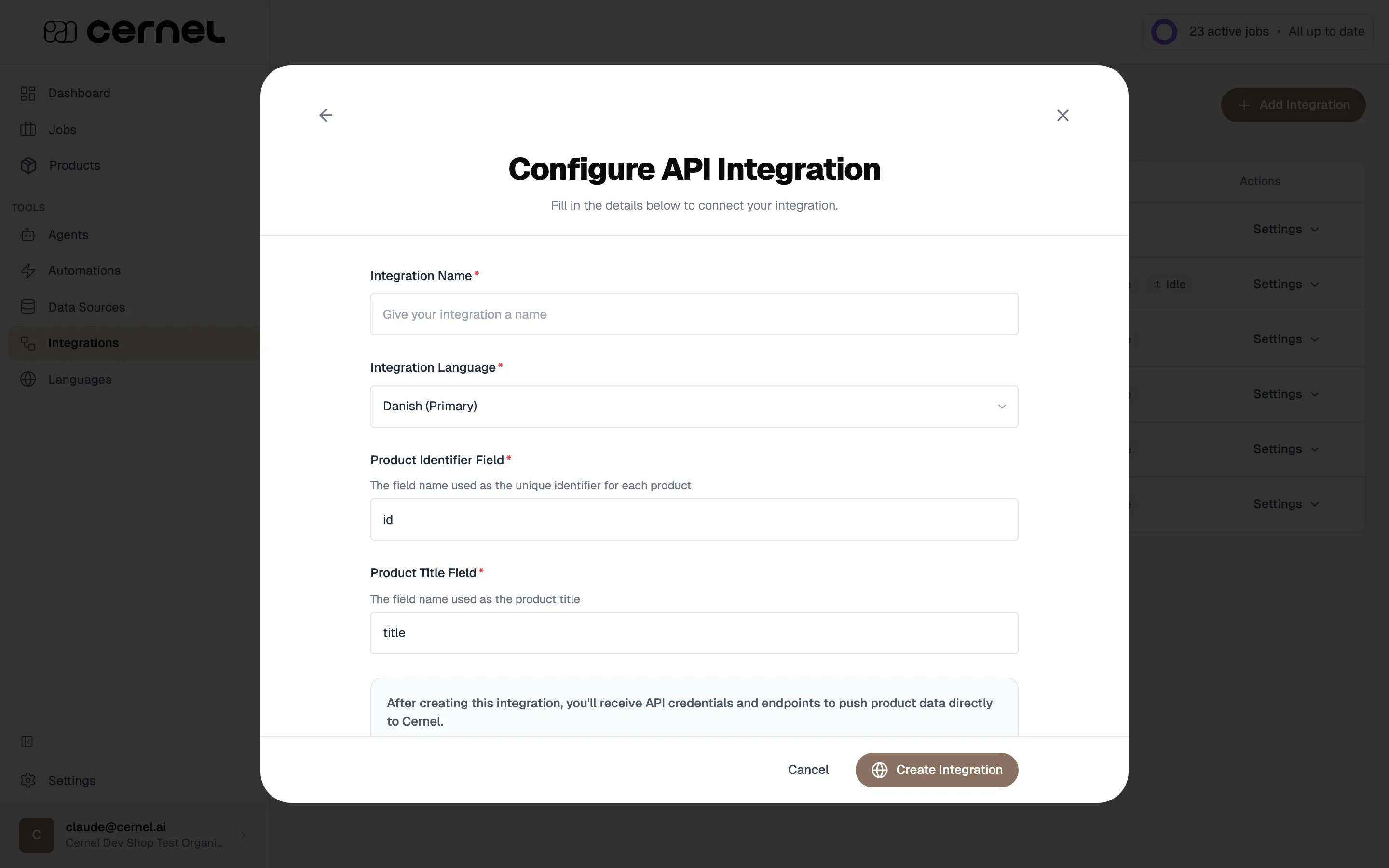
Go to Tools > Integrations, click Add Integration, and select API Integration.Configure the basics:
Integration Name - A descriptive name
Integration Languages - The languages this integration pushes and pulls product data in. You can pick one language or several: the first one you add is marked Primary and is used as the fallback when a property is pushed without a language. Open Edit Languages later from the integration detail panel to change the list.
Product Identifier Field - The field name used as the unique identifier (e.g., id, sku)
Product Title Field - The field name used as the product title (e.g., title, name)
Properties you push can carry a locale field: Cernel stores each localized value separately and surfaces it for the matching language. Properties pushed without a locale are stored against the integration’s primary language.
2
Get an API key
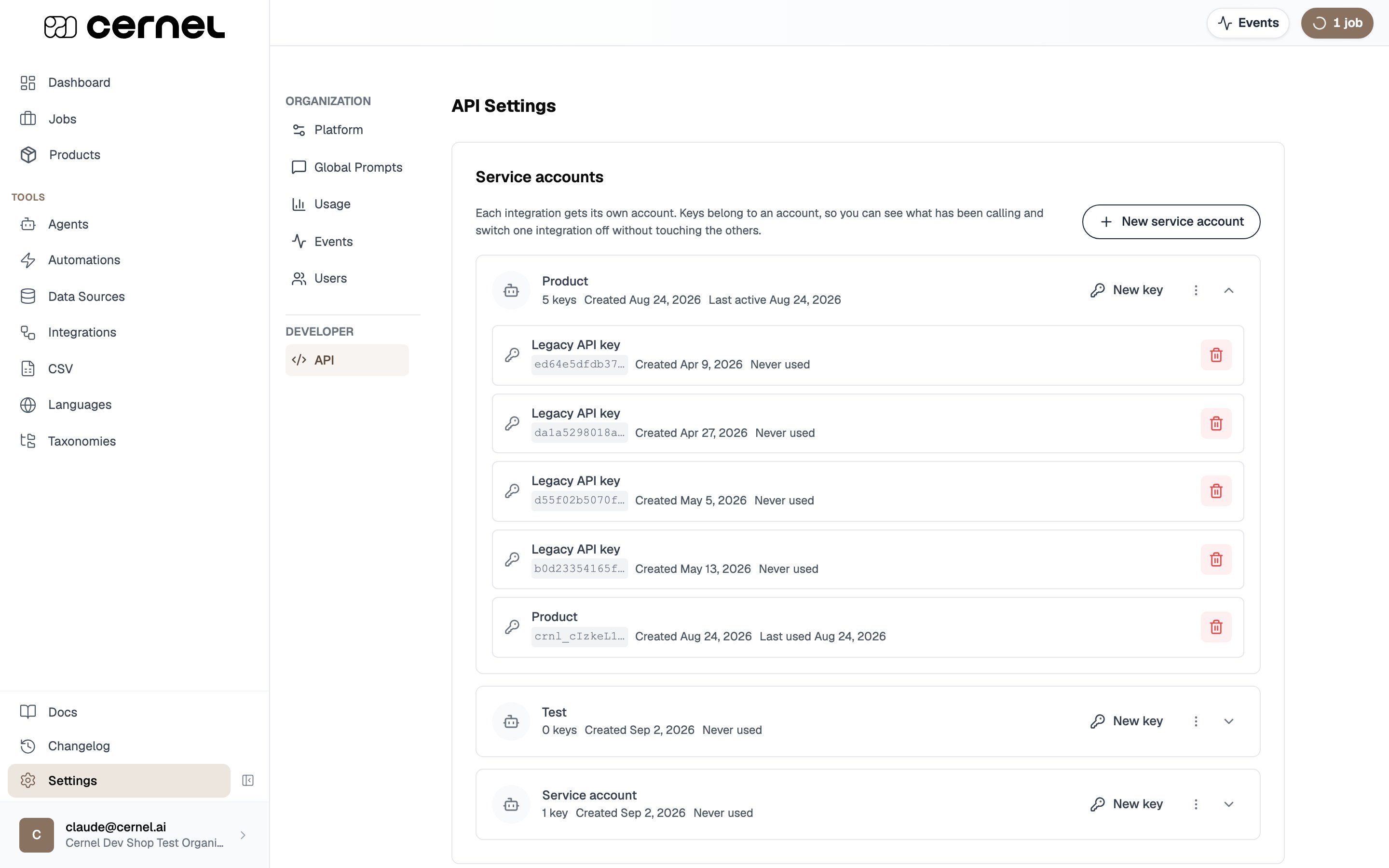
Go to Settings > Developer > API. Keys are organized into service accounts, one per integration. Click New service account, name it after this integration, and it mints a first key. Cernel shows the full key once, right after it’s created, so copy it then and store it somewhere safe.
API keys are organized into service accounts
Keep your API key secure. Anyone with the key can push data to your Cernel organization. To rotate a key without downtime, add a New key on the same service account, switch your integration to it, then revoke the old key. Revoking takes effect immediately.
Click Visit Documentation or go directly to the API Reference to open the full API documentation. This covers all available endpoints, request formats, authentication, and response schemas.
Your API integration is ready. Use your token to authenticate requests and start pushing product data to Cernel.
If your products come from an ERP, PIM, custom database, or supplier feed, you can build a fully automated pipeline: push products in via the API, enrich them with AI using Automations, and get the results back programmatically.
Your System → API (create products) → Cernel → Automation → AI Enrichment ↓Your System ← Changes endpoint (polling) ← Enriched Content ← Review & Approve
Use the create products endpoint to push product data from your system:
POST /api/v1/integrations:api/{integration_id}/products
You can send up to 100 products per request. Products are matched by their identifier field; if a product with the same ID already exists, it’s updated instead of duplicated.
Cernel models variants as a parent product with child products beneath it, for example a master style that splits into colours, and a colour that splits further into sizes. This is the one relationship a CSV import can’t build, since a CSV row has no parent column, so push variant structure through the API (or a Shopify or Struct integration) instead.To build the structure through the API:
Link each variant to its parent with parent_identifier, set to the parent’s own identifier. A variant can itself be a parent, so a colour that splits into sizes is a variant of the master and a parent to its own size variants.
Declare the variant axis on the parent with child_bound_attributes: the attributes whose values make each child distinct, such as Size or Colour.
Carry the axis values on each variant with defining_properties: the values for the attributes the parent declared, for example colorCode: 3007 and color: NAVY for one colour variant.
Setting parent_identifier alone is enough to nest a product under its parent. Without any axis values, though, the child has no variant axis to sit on, so nothing distinguishes it from its siblings the way a Size or Colour would. The FAQ below covers what you get with, and without, those values.
The patch endpoint accepts an array of operations. Each operation locates a product either by product_id (Cernel’s ID) or by identifier (your system’s identifier, exactly one of the two), then sets, removes, or appends localized property values. Each item in the batch is applied as its own transaction, so a bad operation only fails that one item, not the whole batch.Use this when you want to update a single field (e.g., a price change) on thousands of products without re-sending every property you’ve already pushed.
Use the list products endpoint to fetch products that already exist on the integration, with filters:
GET /api/v1/integrations:api/{integration_id}/products
You can filter by identifier (useful for looking up whether a product is already in Cernel before deciding whether to create or patch) and optionally include child products in the response.
Poll the changes endpoint to get a chronological list of enrichment updates:
GET /api/v1/integrations:api/{integration_id}/changes
Use the cursor-based pagination to track where you left off. Each response includes an offset you pass to the next request.
Polling on a schedule (for example, a nightly sync) is the pattern for batch pipelines. To keep downstream systems closer to real time, poll more frequently and use the offset so each poll only returns what changed since the last one.
Reading a category (taxonomy classification) value
A category attribute, the result of taxonomy classification, comes back as a struct value. Because a product can belong to several categories at once, its data carries a nodes array with one entry per category:
path is the category’s display path, and node_id is the category it resolved to.
taxonomy_id and taxonomy_name describe the whole value. One value covers one taxonomy, so a product classified in two taxonomies returns one value per taxonomy.
The entries carry equal weight. If you can store only one category, take the first.
Only a taxonomy set up to place products in more than one category returns more than one entry. Every other taxonomy still uses this shape, with a single entry in the nodes array.A category value that arrived as a path from your side, and that no classification has produced a value for yet, carries node_id, taxonomy_id, and taxonomy_name all null. The three fill in together when a classification replaces the value, so treat a null node_id as unclassified rather than as a state that resolves on its own.
If you integrated before multi-category taxonomies: classifications made back then carried their single category directly on the object, with no nodes array:
Those older values are never rewritten, so you keep receiving both shapes: the older one from products last classified before the change, and the newer one from every classification since. Check for nodes, read it when it is present, and otherwise read path and node_id from the object itself. The value_type descriptor always matches the shape of the data beside it.
When you poll the changes endpoint, add include_summary=true to attach a per-product completeness summary to each change. It answers “how far along is this product?” without a separate lookup:
GET /api/v1/integrations:api/{integration_id}/changes?include_summary=true
Each change then carries a summary object with:
num_attributes: every attribute attached to the category the product is classified in, including ones this integration has no mapping for. When the product sits in one of your own taxonomies, the count is measured against that category; otherwise it falls back to the product’s Cernel category.
num_attributes_with_agents: how many of those attributes an AI agent can fill. The rest are only ever set by an upsert or a manual edit.
locale_summaries: a num_attributes_populated count per locale, covering every language enabled on your organization. A language with nothing filled in yet reports zero rather than being absent. The attribute totals are the same for every locale, so the per-locale counts share one denominator and are directly comparable.
The summary describes the product as Cernel holds it, matching what you see in the dashboard. It measures against your own taxonomy when the product is classified in one, and falls back to the product’s Cernel category otherwise. It is null only when the product is classified in neither, since there is then no attribute set to measure against.
include_summary reads each product’s values across every locale, so it is heavier than a plain change poll and is off by default. Unlike include_all_properties, it does not lower the maximum limit, so you can keep polling at full page size.
For a single product, you can list its required attributes directly instead of deriving them from a change summary:
GET /api/v1/products/{product_id}/attributes
This returns every attribute the product’s categories require, and whether the product holds a value for each. A product can belong to several categories, in one taxonomy or across several, and it requires the combined set of attributes those categories ask for. The response is a flat attributes list, where each entry describes one required attribute:
attribute_id, attribute_name: the attribute itself.
taxonomy_id: the taxonomy the requirement was resolved in. When the same attribute is required in two taxonomies the product is classified in, it appears once per taxonomy.
resolved_anchor_id: the category that set the attribute for this product. Attributes set at a parent category automatically apply to all its subcategories, so where several of the product’s categories require it, this names the one that governs.
contributing_node_ids: every category the product belongs to that requires the attribute. Read this for a per-category view.
is_completed: whether the product holds a value for the attribute in any language.
Turning the list into a completeness figure. The endpoint returns the raw list rather than a percentage, so you choose the scope. Count the entries, count the ones where is_completed is true, and divide the second by the first:
Whole product: use every entry.
One taxonomy: keep only entries with that taxonomy_id.
One category: keep only entries whose contributing_node_ids include that category.
An attribute required by two taxonomies counts once per taxonomy, so narrow to a single taxonomy_id first if you don’t want it counted twice. If the product has no required attributes there is nothing to divide by, which means nothing is required, not that the product is 0% complete.Scoping the resolution. Two optional query parameters narrow what gets resolved. taxonomy_id resolves within a single taxonomy only. taxonomy_node_id resolves within one category’s subtree and excludes any category outside it; it requires taxonomy_id, since a subtree lives inside one taxonomy.
The changes summary (include_summary=true) gives aggregate counts across a whole poll, while this endpoint returns the per-attribute detail for one product: which attributes it requires and which are still empty. Use the summary to track progress in bulk, and this endpoint to see exactly what is missing on a given product.
Full update: push the complete product payload to POST /products. The identifier field matches against existing products; Cernel replaces the property values you send.
Partial update: send a PATCH /products operation that only includes the properties you want to change. Locate the product by product_id or identifier (exactly one of the two), then set, remove, or append localized values. Each operation runs in its own transaction, so a single failure doesn’t roll back the batch.
Updated product data can re-trigger automations if the product matches automation criteria.
Reapplying mappings after a configuration change
When you change how a property is mapped, adjust an agent, or update an attribute, the products already in your integration keep their current values until they’re processed again. To re-run your current property mappings across every product in the integration, without re-sending them through the API:
Open the integration from Integrations and click the Settings menu near the top of the detail page.
Choose Reset Integration.
Select Reapply mappings and confirm.
Reapplying mappings re-runs the current property mappings on your existing products. It’s faster than a full restart because no source data is re-ingested: Cernel simply re-processes the products it already holds.The other reset option, Restart from scratch, re-imports all products from an integration’s source. API integrations receive products directly rather than importing from a source, so that option doesn’t apply to them. Reapplying mappings is the equivalent operation for an API-driven catalog.
Working with multiple languages
An API integration can be configured for any number of languages; see Setting up the API integration for the Integration Languages picker.When you push or patch product properties, each property can carry a locale field. Cernel stores each localized variant separately and exposes the matching language to enrichment, the product UI, and the /changes endpoint. Properties pushed without a locale are stored against the integration’s Primary language.This lets one API integration cover, for example, a Danish reference catalog with English and German translations alongside it, without setting up separate integrations per language.
You can choose to fully delete the product or just unlink it from the integration while keeping it in Cernel.
Tracking enrichment changes
The changes endpoint returns enrichment updates in chronological order. Use it to build an audit trail or sync enriched content to downstream systems.Pass include_all_properties=true to get the full product snapshot with each change (useful for full syncs, but limited to 10 results per request). Pass include_summary=true to attach a completeness summary (attributes defined, AI-fillable, and populated per locale) to each change without lowering the page size. See Tracking product completeness.
The full API reference is available at api.platform.cernel.com/api/v1/docs, also accessible from the API Docs tab at the top of this site or from Settings > Developer > API in the app. It covers all endpoints, authentication, request/response formats, and error codes.
How do I rotate my API token?
Go to Settings > API and click New key. A new token is generated immediately and the old one stops working. Update any systems using the old token.
How do I get enriched content back out of Cernel over the API?
Poll the changes endpoint: GET /api/v1/integrations:api/{integration_id}/changes. It returns enrichment updates in chronological order, and you use the offset it returns to pick up where you left off on the next poll. There is no push-style webhook delivery on the Public API, so retrieving results is always a poll from your side. See Getting enriched data back.
Can I link a variant to its parent without a variant-defining attribute?
Yes. Setting a product’s parent_identifier is enough to make it a child of that parent: a variant-defining attribute isn’t required for the link itself. Cernel accepts the product and nests it under the parent, so it appears among the parent’s children rather than in the flat product list.Without any variant-defining values, though, the child has no variant axis, so nothing distinguishes it from its siblings the way a Size or Colour would. Add defining_properties for the attributes the parent declared as child_bound_attributes when you want each variant identified by its own axis values. See Creating variant structure.
Can I integrate a platform like Magento that doesn't have a native connector?
Yes, through the Public API. Cernel has native integrations for Shopify and Struct, plus CSV import and export. For any other platform, including Magento, you connect over the Public API: your side pushes products in, pulls the enriched results back by polling the changes endpoint, and writes them into your platform’s own API. That write into your platform is custom code on your side, since Cernel does not host it.Unlike a CSV round trip, the API can model variant (parent and child) structure, so a catalog where the same product exists in several variants, for example one ring in three metals, is fully supported. Set each child’s parent_identifier to nest it under its parent. See Creating variant structure and the ERP to Cernel to e-commerce platform walkthrough, which is the same pattern any custom platform integration follows.
Can I create or edit AI Agents and Data Sources through the API?
No. The API is for product data and the enrichment pipeline: pushing and updating products, polling for changes, and triggering enrichment through your automations. Configuration of AI Agents, Data Sources, attributes, automations, and your taxonomy is done in the Cernel app, not through the API. Set those up once in the platform, then let the API drive products through them.