

How it works
The Shopify integration creates a live connection between your store and Cernel through Shopify’s OAuth flow. Once authorized, Cernel imports your products (names, descriptions, images, variants, and metadata) and keeps the connection open for pushing enriched content back. Unlike one-way integrations like CSV or Product Feed, Shopify supports bidirectional sync: data flows from Shopify into Cernel and from Cernel back to Shopify.Why you would use this
Two-way product sync
No manual data handling
Integration overview
After connecting your store, the integration appears in Tools > Integrations with these properties:- View Integration Details: Open the full configuration panel
- Integration Enabled: Toggle the integration on or off without removing it
- Reset Integration: Reapply mappings, restart the import, or restart the export (see Resetting the integration)
- Remove Integration: Disconnect the store entirely
Integration details
The integration detail view shows the full state and configuration of your Shopify connection.Overview panel
The top section displays:- Integration ID: Unique identifier (useful for API access)
- Status: Enabled or Disabled
- Languages: Which language(s) this integration covers
- Created / Last Updated: Timestamps for when the integration was set up and last modified
- Auto Sync: Whether Cernel automatically re-syncs products from Shopify on a schedule
- Sync Mode: How updates are applied (see Sync behavior)
Data import
The Data Import section shows the current state of the inbound sync:- Sync Status: Idle (no sync running), Syncing (import in progress), or Error
- Last Sync: When the most recent import ran
- Last Completion: Status of the most recent completed sync
Property mapping
Property mapping controls how data flows between Shopify fields and Cernel attributes. Open the mapping view from the integration detail panel. The mapping interface displays three columns:Adding a mapping
Click + New Mapping to create a new connection. You can:- Map a Shopify source field to a Cernel attribute (inbound)
- Map a Cernel attribute to a Shopify target field (outbound)
- Map both directions for the same attribute (bidirectional)
Removing a mapping
Click the x next to any source or target field to remove that side of the mapping. Removing a mapping does not delete any data already imported or synced.Mapping from the Properties tab
The integration detail view has a Properties tab next to Property Mapping. It lists every property your Shopify store exposes, alongside the Cernel attributes and identifiers each one is already connected to. To map a property without switching to the Property Mapping tab, click the + button on its row. This opens the mapping picker with that property preselected, so you can connect it to a Cernel attribute in one step. Use Search properties to find a specific field.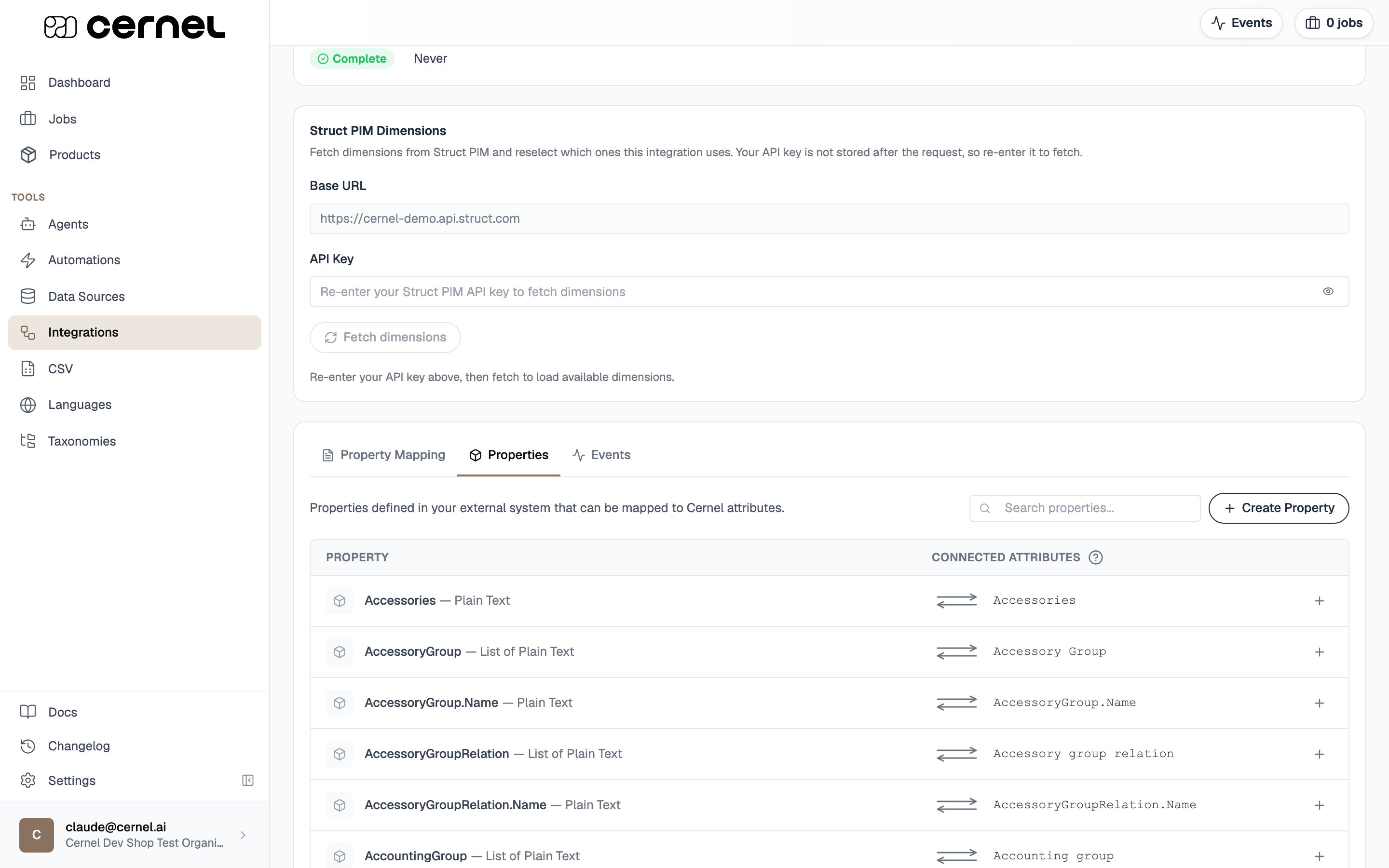
Sync behavior
After setup, Cernel keeps your catalog up to date automatically. It continuously checks Shopify for changed products in the background, and updated products typically appear in Cernel within a minute. Only products that changed since the last sync are re-imported, so day-to-day syncs stay fast regardless of catalog size. Archived Shopify products are not imported. Products and variants in every other status (active and draft) are.Auto Sync
When Auto Sync is enabled, Cernel periodically re-imports products from Shopify to keep your catalog up to date. When disabled, syncs only happen when you trigger them manually from the integration detail panel.What data syncs
From Shopify into Cernel
From Cernel back to Shopify
Not yet supported
- Videos and non-image files are not synced in either direction; media support covers images.
- Complex metafield types are import-only. Money, measurements, ratings, and references to other products can be imported, but Cernel does not push values back as these Shopify types.
- Updating only the alt text of an existing Shopify image. Cernel sets alt text on the images it creates, but cannot edit the alt text of an image that already exists in Shopify.
- Collections, bundles, and sibling products are not managed by Cernel.
Languages
The integration’s languages are taken from your Shopify store when it connects, and its default language is the store’s default language (see Settings > Languages in your Shopify admin). Enriched content flows to the languages configured on the integration: each language pushes as the matching Shopify translation. Each connected store is its own integration with its own languages, so you can run several stores side by side and target an attribute at more than one store.Working with product variants
By default, Cernel syncs a Shopify product as a single record using the product’s top-level data. If your catalog uses product variants in Shopify (for example, the same product in multiple sizes or colours), turn on Variants for the integration so Cernel imports each variant as its own variant record under the parent product. You’ll find the Variants control on the Shopify integration detail panel, alongside the other connection-level flags.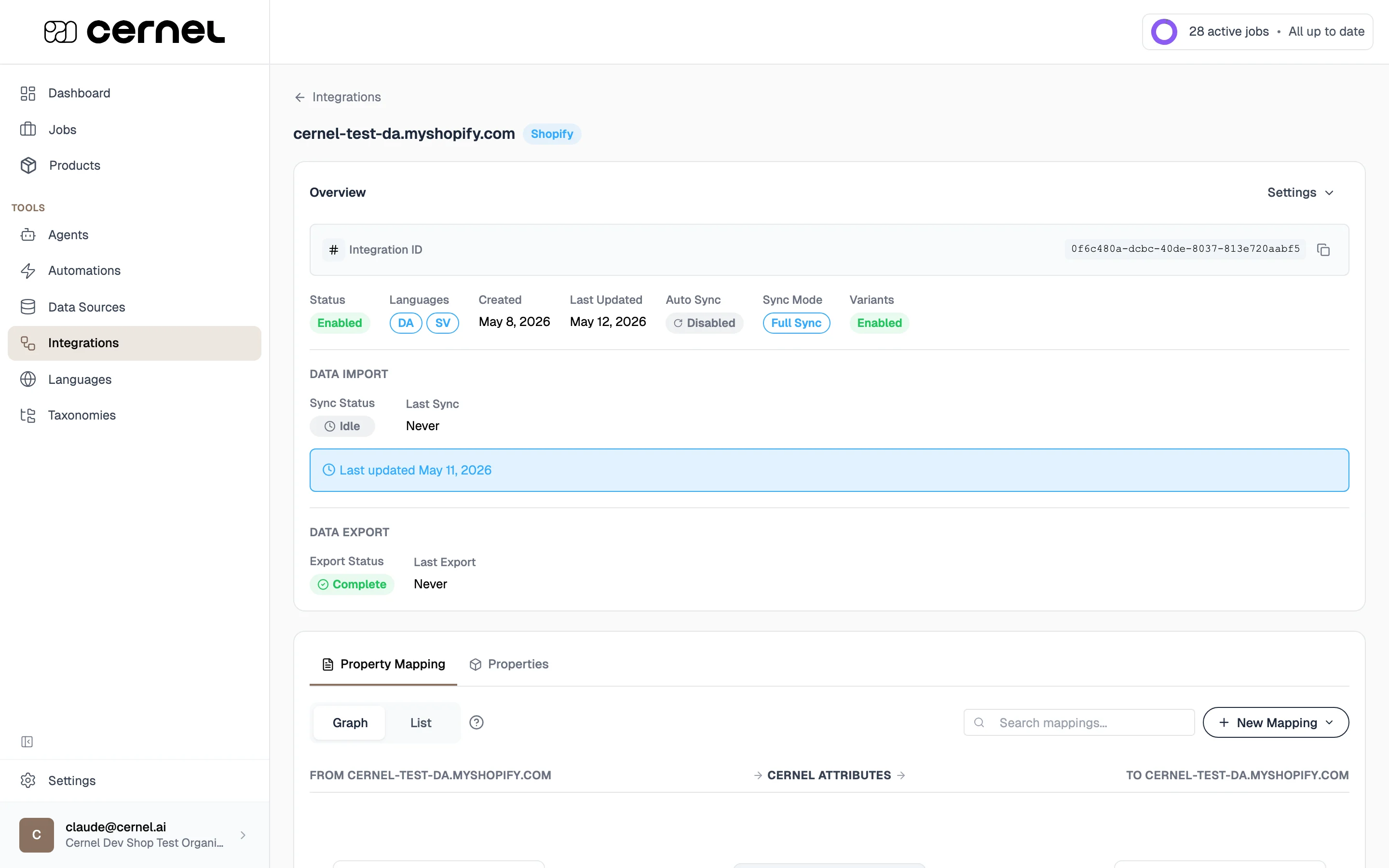
Open the integration detail panel
Click Enable next to Variants
Confirm the change
Syncing to Shopify metafields
For structured data that doesn’t map to standard Shopify product fields (like materials, care instructions, or size guides), you can sync Cernel attributes as Shopify metafields. Metafields are custom key-value fields in Shopify. When you map a Cernel attribute to a metafield target, the enriched value is pushed to Shopify under the namespace and key you configure. Your Shopify theme can then render these metafields on product pages.Cernel creates the metafield definitions for you
You don’t need to pre-create metafield definitions in Shopify before mapping them. When you map a Cernel attribute to a new metafield (using anamespace.key that doesn’t yet exist in Shopify), Cernel creates the metafield definition in your Shopify store automatically, including the correct value type based on your Cernel attribute configuration.
If a metafield definition with the same namespace and key already exists in Shopify, Cernel uses the existing definition instead of creating a new one. If the existing definition has a different value type than the Cernel attribute, the mapping is rejected so you can resolve the mismatch (either by renaming the Cernel attribute, choosing a different namespace and key, or updating the existing Shopify metafield to match).
Pushing enriched content to Shopify
There is no manual export step. When a value is approved in Review (or applies directly, because the job ran without review), Cernel pushes it to Shopify automatically in the background, typically within a minute. Values that were imported from Shopify are never echoed back; only content that was enriched or edited in Cernel is pushed. The push updates the mapped output fields, both standard product fields and metafields. Changes are live in Shopify immediately after the sync completes. If you clear a value in Cernel so the attribute becomes empty, the push removes the matching metafield from the Shopify product rather than writing a blank value. Shopify does not accept empty metafields. Clearing a value in just one language removes only that language’s value in Shopify; the other languages are left untouched, and mapped values that still have content are unaffected.Resetting the integration
Day-to-day syncing is automatic, so you rarely need to reset. When you do, open the Settings dropdown on the integration and choose Reset Integration. The dialog offers three actions:- Reapply mappings: Re-run the current property mappings on the products already in Cernel. This is faster than a full restart because it does not re-fetch anything from Shopify, it just reapplies your latest mapping to the data you already have.
- Restart import: Re-import every product from Shopify. Processing time scales with catalog size and can take a while for large stores. Use this after a change that a normal sync would not pick up, such as bringing in a variant edit that never touched its parent product.
- Restart export: Send your enriched Cernel values to Shopify again. Use the Send changes since field to control the scope: leave it on Everything to re-push all mapped values, or pick a date to re-push only the values changed since the start of that day (in your timezone). This is useful if a push was interrupted or you want to force Shopify back into step with Cernel.
Frequently asked questions
Can I connect multiple Shopify stores?
Can I connect multiple Shopify stores?
Can I turn variants off again after enabling them?
Can I turn variants off again after enabling them?
What Shopify permissions does Cernel need?
What Shopify permissions does Cernel need?
Why is the product's online store URL empty for some products?
Why is the product's online store URL empty for some products?
What happens if I disable the integration?
What happens if I disable the integration?
Does resetting the integration delete products from Shopify?
Does resetting the integration delete products from Shopify?
How do I disconnect my Shopify store?
How do I disconnect my Shopify store?
What happens to Shopify if I clear or empty a value in Cernel?
What happens to Shopify if I clear or empty a value in Cernel?
Do I need to create the Shopify metafields myself before mapping them?
Do I need to create the Shopify metafields myself before mapping them?
What kinds of metafield values can Cernel import from Shopify?
What kinds of metafield values can Cernel import from Shopify?
- Common types (text, whole and decimal numbers, true/false, dates, URLs, and money) import directly into the mapped attribute.
- Measurement types (weight, dimensions, volume, temperature, and the like) import as a numeric value together with its unit, so both are preserved.
- Multi-value (“list”) metafields import as a list of values, including lists of measurements.
- Image file references import as images; references to other products import as IDs. Video and other file references are not imported.
- Any value type Cernel doesn’t model natively imports as plain text, so the data is never dropped.
Why isn't a change I made to a variant showing up in Cernel?
Why isn't a change I made to a variant showing up in Cernel?
Are archived Shopify products imported?
Are archived Shopify products imported?
Does my organization's language need to match my store's language?
Does my organization's language need to match my store's language?
What happens if I add a second store whose language isn't enabled on my organization?
What happens if I add a second store whose language isn't enabled on my organization?