

Tools overview
The Tools section in the main sidebar holds the workspaces you return to as part of daily enrichment work:Settings overview
Click Settings at the bottom of the sidebar to access platform and team configuration.Global settings
Organization settings
Developer settings
See Developer Tools for a full guide on API keys and service accounts.
Key platform settings
Approve Before Push
When enabled, AI-generated content must be explicitly approved before it syncs to your connected integrations. This gives you full control over what gets published to your store. Find this at Settings > Platform under “Enable ‘Approve Before Push’.”Global Prompts
System-level instructions that apply to all AI agents. The page lists a system prompt per attribute type (Text, HTML, Single Select, Multi Select); click Edit Prompt on any type to customise it. These instructions are automatically included when an agent generates that type of content. Per-language instructions live elsewhere: open a language under Tools > Languages to set its translation prompt. See Languages.Global Prompts combine with individual agent prompts. You don’t need to repeat organization-wide rules in every agent. Put universal rules in Global Prompts, and content-specific instructions in agent prompts.
Usage tracking
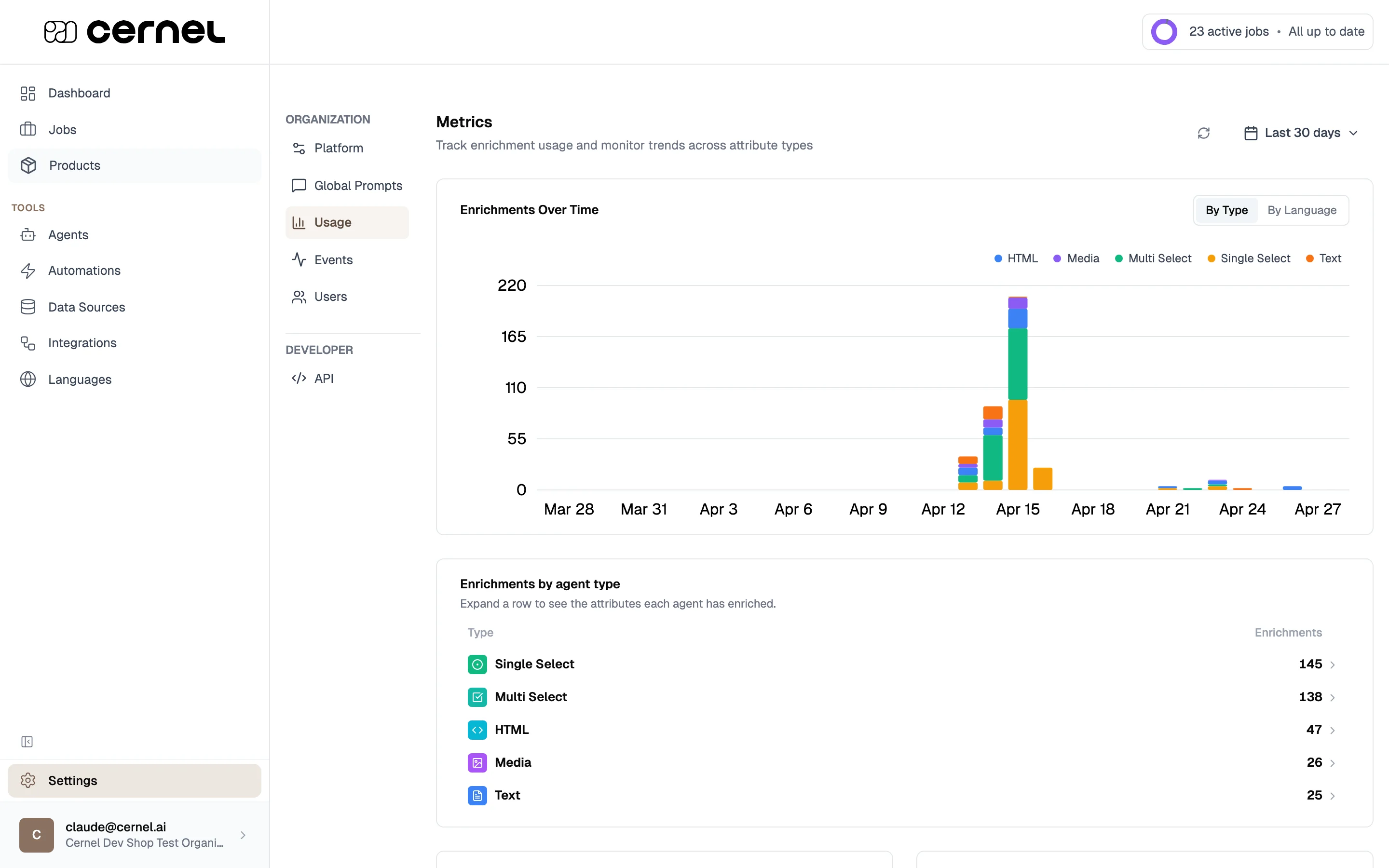
The Usage page (Settings > Usage) shows your enrichment activity:- Elements Run Total - Total number of attribute values generated
- Total Jobs - Number of enrichment jobs run
- Avg Elements Per Job - Average attribute values generated per job
- Elements Run Today - Today’s generation count
- Enrichments over time as a trend chart
- Breakdown by type (Text, HTML, Single Select, etc.)
- Breakdown by language for localization tracking
Event Log
The Event Log (Settings > Events) gives you a real-time view of system activity across your Cernel platform. Use it to monitor what’s happening with your integrations, enrichment runs, and product processing, and to quickly diagnose issues when something goes wrong.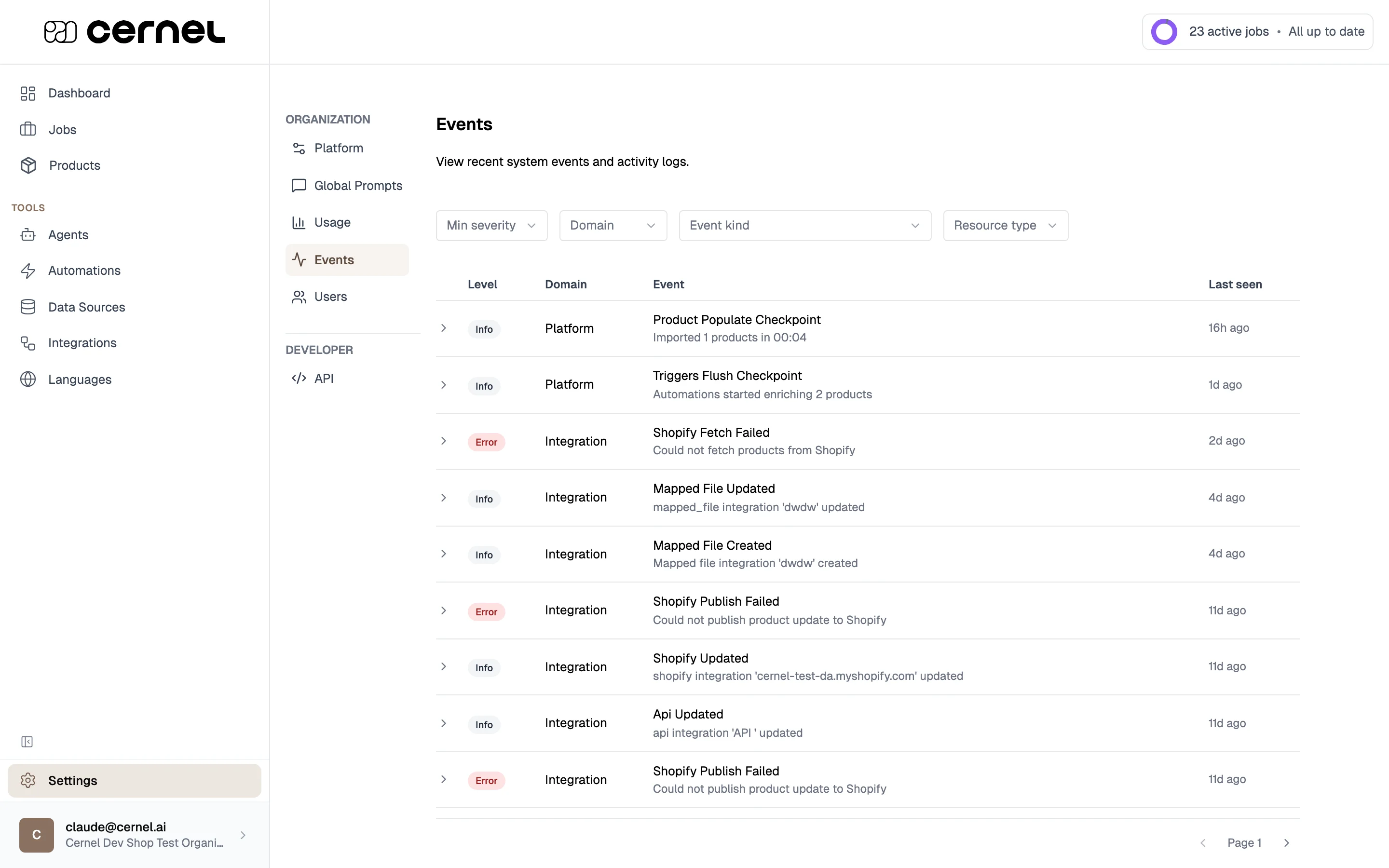
Click any event row to expand it and see additional details: how many times it occurred, when it was first and last seen, the associated integration (if applicable), and any diagnostic information.
Filtering events
Use the filter toolbar at the top of the page to narrow down what you see:- Min severity: Show only events at a certain severity level or above
- Domain: Filter to events from a specific platform area
- Event kind: Filter to a specific type of event
- Resource type: Filter by the type of resource involved (e.g., product, integration)
Category depth
Control how many levels of your taxonomy appear in the sidebar navigation. Set this at Settings > Platform. Choose between 3 and 7 levels. This is display-only and doesn’t affect how attributes flow or how enrichment works.Frequently asked questions
What's the difference between Tools and Settings?
What's the difference between Tools and Settings?
Tools are the workspaces you use day-to-day to configure how enrichment runs: Automations, Data Sources, Integrations, and Languages. They live at the top of the sidebar because you visit them regularly. Settings (at the bottom of the sidebar) holds platform-level and team configuration you change infrequently: Global Prompts, Usage tracking, Users, and API keys.
What's the difference between Global and Organization settings?
What's the difference between Global and Organization settings?
Global settings affect how the platform behaves for everyone in your workspace (Global Prompts, Usage tracking). Organization settings manage team access (Users).
Who can access settings?
Who can access settings?
Admin users can access all settings. Regular users have limited access depending on their role. User management (inviting, removing, changing roles) is admin-only.
Where do I track my enrichment usage?
Where do I track my enrichment usage?
Settings > Usage. This shows total enrichments, trends over time, and breakdowns by type and language.
Where can I see errors from my integrations?
Where can I see errors from my integrations?
Go to Settings > Events and filter by Domain: Integration and Min severity: Error. The event log shows all recent errors along with details about what went wrong. Expand any event row for diagnostic information including occurrence count and timestamps.
How do Global Prompts interact with agent prompts?
How do Global Prompts interact with agent prompts?
Global Prompts are prepended to agent prompts automatically. The AI receives both: the Global Prompt first (for universal rules), then the agent’s specific prompt (for content instructions). This means rules like “never use superlatives” only need to be set once in Global Prompts, not in every agent.
What’s next
Users & Team
Manage team members, roles, and invitations.
Languages
Enable languages and configure language-specific Global Prompts.