

Add-on module. Review Steps is a module that is not enabled by default. Contact your Cernel representative to enable it for your organization.
How it works
A review step is a prompt-based check that lives on an agent. When the agent enriches a product, each of its review steps looks at the value the agent just wrote and judges it against your instruction, for example “Fail the enrichment if it claims the product is sustainable, recycled or eco-friendly without the product data saying so.” The step returns a simple verdict: Passed or Failed. What happens on a failure is your choice, set per step under If this check fails:- Ignore it reaches your catalog as usual. The failed check is still recorded, so you can look at it later.
- Hold for review makes the enrichment wait for a person to approve or reject it before it reaches your catalog.
- Reject rejects the enrichment outright, so it never reaches your catalog.
Why you would use this
Meet compliance rules
Enforce brand governance and tone of voice
Validate claims against the facts
Govern enrichment at scale
What to check for
A review step is just a prompt, so it can enforce almost any standard you can describe in a sentence. The most common uses:- Compliance and regulated claims. “Fail the enrichment if it makes a medical or health claim, such as cures, treats or prevents, that the product data does not support.”
- Brand governance and safety. “Fail if the text names a competitor brand, or uses absolute superlatives like ‘best’ or ‘number one’ without evidence.”
- Claim validation and accuracy. “Fail if it states a material, dimension or certification that is not present in the product data.” (This is the built-in example: “Fail the enrichment if it claims the product is sustainable, recycled or eco-friendly without the product data saying so.”)
- Tone of voice. “Fail if the tone is casual or uses slang. Our brand voice is warm but professional, and we address the reader in the second person.”
- Formatting and length. “Fail if the meta description is longer than 160 characters, or if it contains HTML tags.”
- Language and market. “Fail if the text is not written entirely in French.”
Key concept: the strongest consequence wins. An agent can have several review steps, and a single enrichment can fail more than one. When it does, the strongest consequence among the failed steps applies: one step set to Reject is not softened by another set to Ignore it. So a value is rejected if any failed step rejects, held if any failed step holds and none reject, and let through only when every failed step is set to ignore. This lets you mix a hard compliance gate (Reject) with a softer brand-voice check (Hold for review) on the same agent.
Step-by-step guide
1
Open the Review Steps tab on an agent
Create or edit an agent in the Agent Sandbox. In the configuration panel on the left, open the Review Steps tab. The tab shows how many checks the agent has, and you can add up to 3 review steps per agent.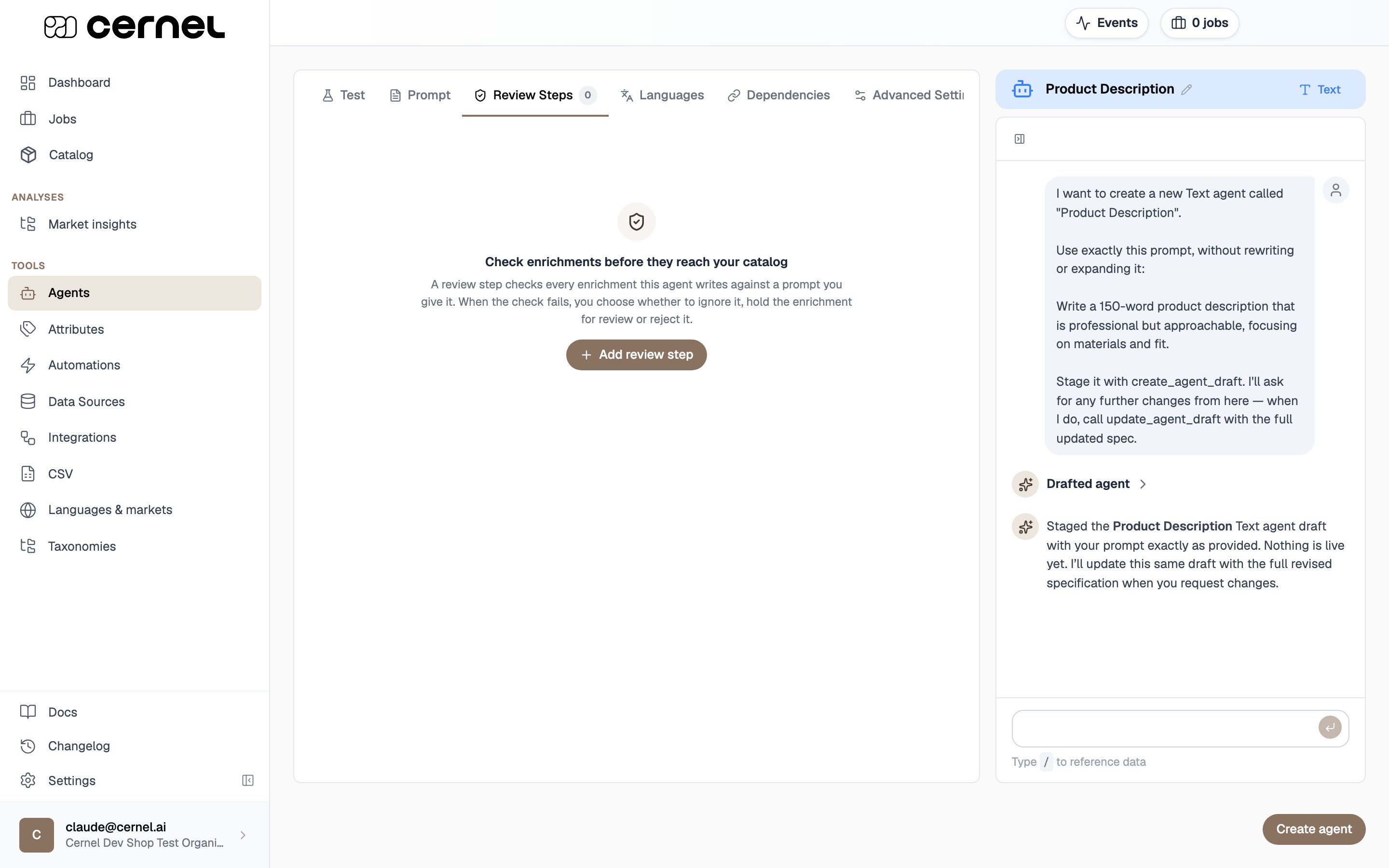
2
Add a review step and write its prompt
Click Add review step. Give the step a Name, then write the Review step prompt that describes what an enrichment must do to pass. Be concrete and phrase it as a failing condition, for example “Fail the enrichment if it …”.
3
Choose what happens when the check fails
Under If this check fails, pick the consequence: Ignore it, Hold for review, or Reject. The step summary reflects your choice, for example Held for review when it fails or Rejected when it fails.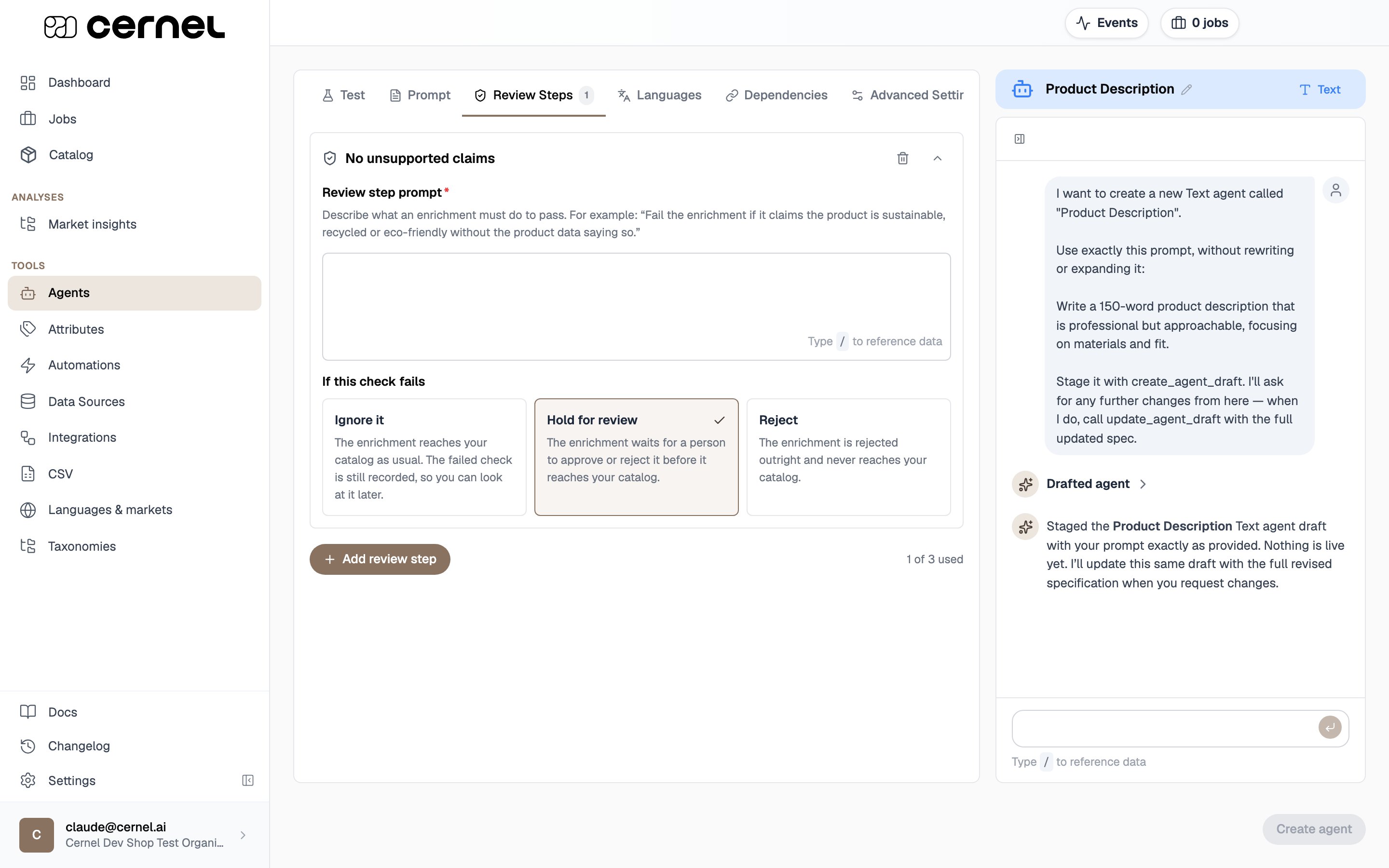
4
Save the agent and run enrichment
Save the agent. From now on, every enrichment this agent writes is checked by its review steps. Run enrichment as usual, then open Review to see the results.
The agent now carries its review steps. When you run enrichment, values that fail a check are held or rejected according to the consequence you set, and you will see the outcome in Review.
5
See the verdicts in Review
On the Review surface, each proposed value shows whether it passed or failed its checks. A value card carries a shield: green when every step passed, and marked as failed when any step did not. Open it to see the per-step verdicts, each labelled Passed or Failed, with a summary such as 2 of 3 review steps failed or The enrichment passed all 3 review steps, and a note explaining the consequence that was applied.
Advanced configuration
Understanding the reviewer's reasoning
Understanding the reviewer's reasoning
Every review-step verdict can show its reasoning. On a value, open How the reviewer reached this to read why the check passed or failed. Where the reasoning was not captured inline, a Why did the review steps say this? button generates the explanation on demand, so you can always see the thinking behind a verdict.Use this when a verdict surprises you: the reasoning usually shows whether the check read the value the way you intended, which tells you whether to reword the value or the review-step prompt.
Writing an effective review-step prompt
Writing an effective review-step prompt
Keep each check about one clear standard, and phrase it as the failing condition, “Fail the enrichment if …”, so the verdict is unambiguous. Judge the value on what it says or shows, its wording, claims, tone, or format, rather than on how it was generated. A claim-validation check can hold the value against the product’s own data, as the built-in example does when it fails a sustainability claim the product data does not support. If a verdict comes back wrong, open its reasoning to see how the check read the value, then tighten either the value’s prompt or the review-step prompt.
Combining Hold for review with approve-before-push
Combining Hold for review with approve-before-push
Review steps work alongside your organization’s approve-before-push setting. A value that every check passes still follows your normal Review setting for that run. A value a check sets to Hold for review is always collected in Review for a person to decide, even on a run where approval was otherwise off. This lets you keep most enrichment flowing automatically while still stopping the specific cases your checks catch.
Frequently asked questions
How many review steps can one agent have?
How many review steps can one agent have?
Up to three. The tab shows a of used count so you can see how many you have added. If you need more distinct checks than that, focus each step on the rule that matters most, since a single well-aimed check is more reliable than several loosely combined ones.
Does a failed review step delete the value?
Does a failed review step delete the value?
No. The value the agent generated is always written down and kept, with its full history. A review step only decides whether that value is allowed to go live: Ignore it lets it through, Hold for review waits for a person, and Reject stops it from reaching your catalog. A held or rejected value stays visible to you in Review.
An enrichment failed two checks with different settings. Which one applies?
An enrichment failed two checks with different settings. Which one applies?
The strongest consequence wins. If any failed step is set to Reject, the value is rejected. If none reject but any failed step is set to Hold for review, the value is held. The value is only let through when every failed step is set to Ignore it.
Where do I find values that a review step rejected?
Where do I find values that a review step rejected?
They are hidden from the Review queue by default because there is nothing to approve. Turn on Show failed, skipped & rejected in the toolbar to see them, read the reasoning, and Dismiss each one once you have looked at it.
Why was a value let through with a warning instead of being checked?
Why was a value let through with a warning instead of being checked?
That means the review steps could not run for that enrichment. Rather than block your catalog, Cernel writes the value and flags it with The review steps could not run. Give those values a closer look, and if it keeps happening, re-run enrichment on the affected products.