

Magento is in beta. It shows a Beta label in the integration picker.
How it works
A Magento admin creates an integration in the Magento admin, which gives four keys. You enter those keys in Cernel, Cernel reads your store views, and you pick the Cernel language for each one. From then on, Cernel keeps your catalog up to date and writes approved values back. Like Shopify, Struct PIM and inriver, Magento is a two-way integration: data flows from Magento into Cernel and from Cernel back to Magento.Why you would use this
Two-way product sync
Import products from Magento and write enriched descriptions, titles, meta fields and attribute values back to the same store.
One language per store view
Each store view maps to one Cernel language, so Danish text goes to your Danish store view and German text to your German one.
Key concept: default values and store views. Magento keeps one set of default values, which every store view shows unless it has text of its own. Your main language goes to those default values. Every other language goes to the store view you map it to.
Before you start
- Magento version. Magento Open Source or Adobe Commerce 2.4.
- Languages in Cernel. Add the languages your store views use under Tools > Languages & markets first. Setup only offers languages your organization already has.
- Network access. If a firewall or WAF limits who can reach your store’s REST API, contact Cernel support for the addresses to allow.
Step-by-step guide
1
Create an integration in Magento
A Magento admin does this once for each store you connect.
- In the Magento admin, go to System > Extensions > Integrations and click Add New Integration.
- Name it
Cerneland enter your admin password to confirm. Leave Callback URL and Identity link URL empty. - Open the API tab, set Resource Access to Custom and tick:
- Catalog > Inventory > Products
- Catalog > Inventory > Categories
- Stores > Settings > All Stores
- Stores > Attributes > Product
- Stores > Attributes > Attribute Set
- Click Save. Then click Activate next to the integration and Allow.
2
Open the integration picker
In Cernel, go to Tools > Integrations and click Add integration. Cernel opens the Connect your catalog picker with every supported integration as a card.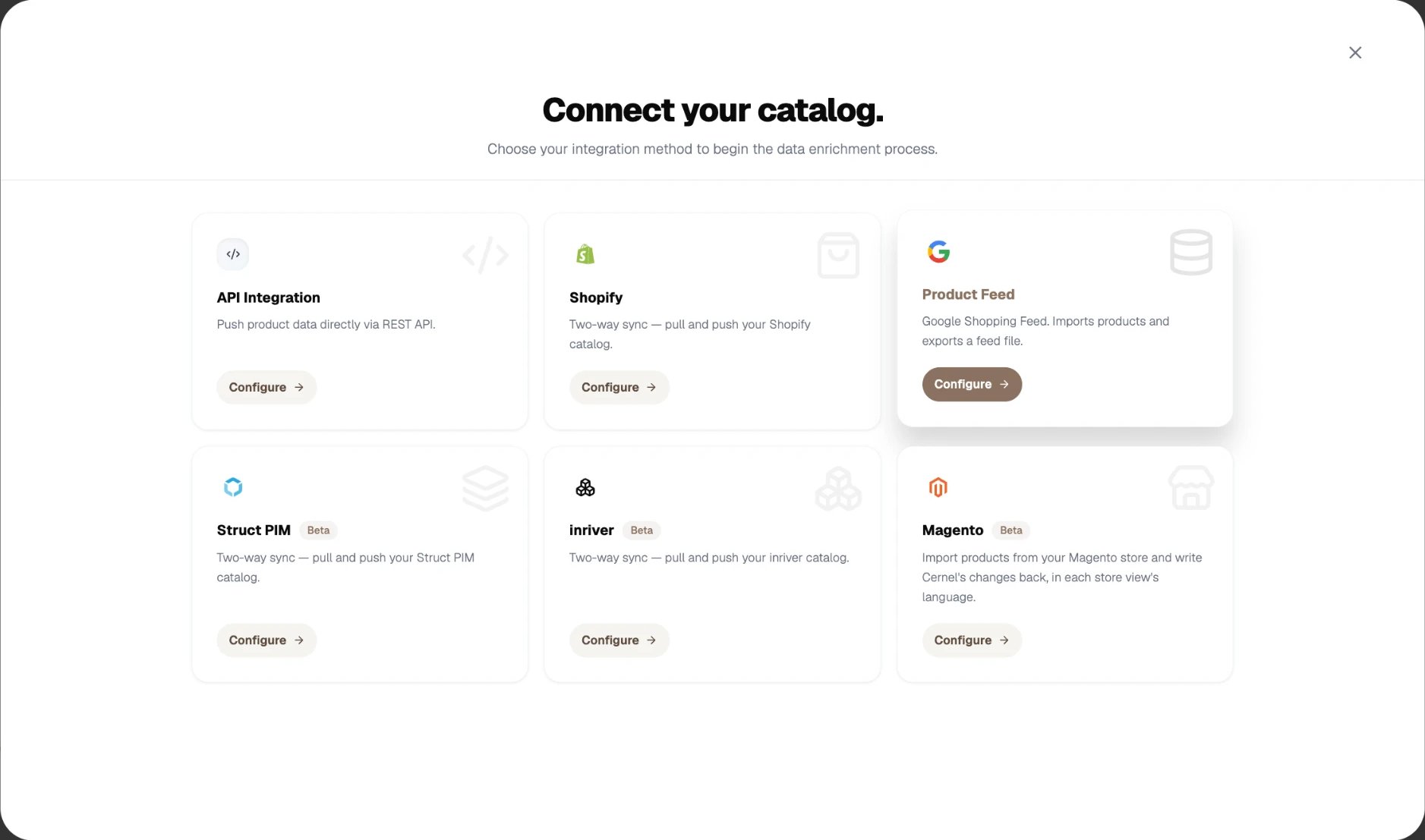
3
Choose Magento
Click Configure on the Magento card. Cernel opens the Configure Magento form.
4
Fill in the connection details
Enter the details for your store: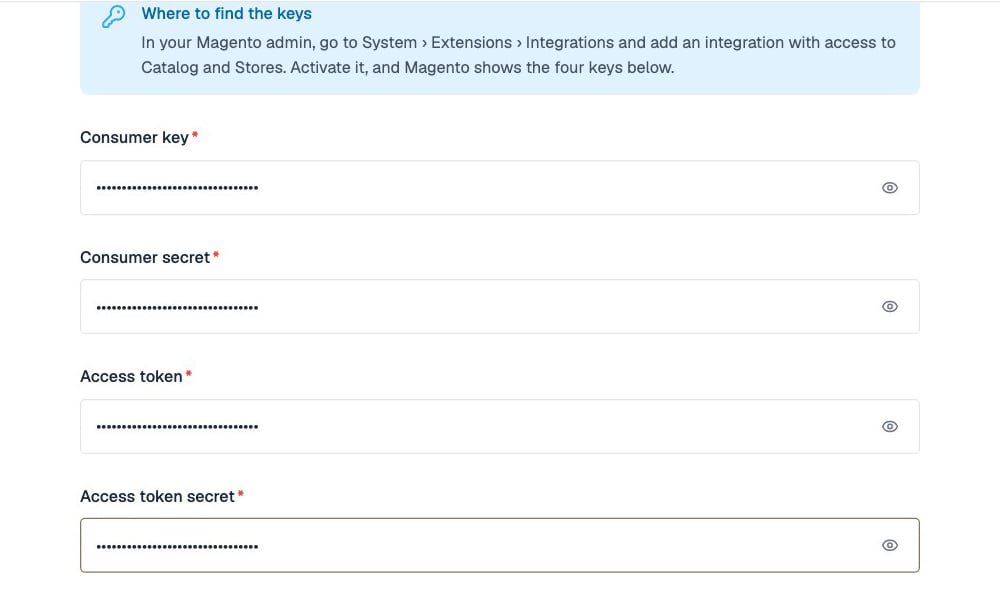
- Name: A name for the integration (for example,
Webshop). - Store URL: Your store’s web address, without
/admin(for example,https://shop.example.com). - Consumer key, Consumer secret, Access token and Access token secret: The four keys Magento showed when you activated the integration. Click Show keys to check what you pasted.
5
Choose languages
Cernel lists your store views with their website and Magento language, and fills in the Cernel language for each one from Magento.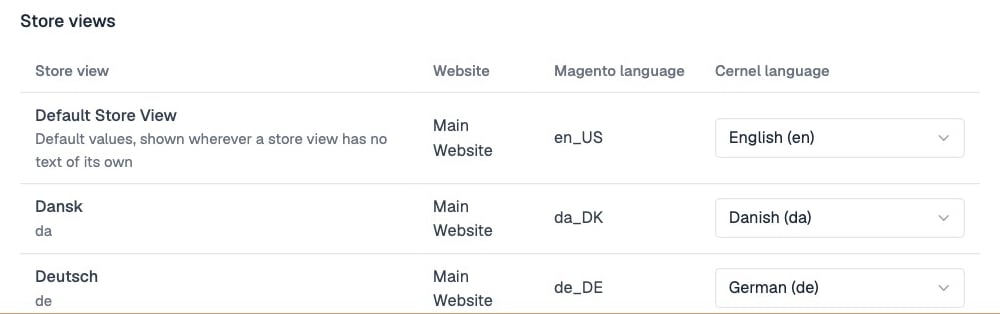
- The first row is your main store view. Its language goes to the default values, which every store view shows unless it has text of its own.
- Change a store view’s language if its text is in another language than Magento says.
- Each Cernel language & market goes to one store view at most.
- Choose Not imported to leave a store view out.
6
Create the integration
Click Create Integration.
Your Magento integration appears under Tools > Integrations. Products begin arriving in your Catalog and are ready for enrichment.
Property mapping
Cernel maps each Magento attribute to a Cernel attribute named after the attribute’s label in the Magento admin. If your organization already has an attribute with that name, Cernel uses it. Every attribute Cernel can write is mapped both ways from the start. To keep Cernel from writing a field, remove its To Magento mapping in the integration’s Property Mapping view. The workflow is the same as in the Shopify integration guide.Sync behavior
Importing changes from Magento
A change you save in Magento usually reaches Cernel within a few minutes. Products you delete in Magento can take up to a day to leave Cernel.Writing enriched content to Magento
There is no manual export step. When a value is approved in Review (or applies directly, because the job ran without review), Cernel writes it to Magento in the background:- Values in your main language go to the default values.
- Values in another language go to the store view you mapped that language to.
- A field Magento keeps per website or for the whole store has one value for every store view, so Cernel writes it from your main language only.
Cernel never writes a product’s price, SKU, status, visibility or URL key. Those decide whether, where and for what a product sells, so they stay yours to set in Magento.
Resetting the integration
Day-to-day syncing is automatic, so you rarely need to reset. When you do, open the integration’s menu and choose Reset Integration:- Reapply mappings: Re-run the current property mappings on the products already in Cernel. This is faster than a restart, because nothing is fetched from Magento again.
- Restart import: Import every product from Magento again. Processing time scales with catalog size.
What data syncs
Magento also limits how long a value can be. A short text field holds 255 characters, so Cernel skips a longer value for that field rather than send one Magento would refuse.
Frequently asked questions
Where do I find the four keys?
Where do I find the four keys?
In the Magento admin, under System > Extensions > Integrations. Create an integration with the access listed in step 1, then activate it, and Magento shows the Consumer Key, Consumer Secret, Access Token and Access Token Secret. To see them again later, open the integration in Magento: its Integration Details list all four.
Do I need to install an extension in Magento?
Do I need to install an extension in Magento?
No. Cernel uses Magento’s own REST API, through the integration you create in step 1.
Will Cernel slow down my store?
Will Cernel slow down my store?
Cernel sends one request at a time, which keeps the load on your store low. The first import of a large catalog takes a while for the same reason. After that, Cernel only reads what changed.
Can Cernel change prices, stock or whether a product is online?
Can Cernel change prices, stock or whether a product is online?
No. Cernel reads the price, status and visibility but never writes them, and it doesn’t touch stock. It never writes the SKU or URL key either.
Can Cernel create new attributes or dropdown options in Magento?
Can Cernel create new attributes or dropdown options in Magento?
No. Create the attribute in Magento and add it to the attribute set, or add the option to the dropdown. Cernel picks it up from there.
Does each store view need its own Cernel language?
Does each store view need its own Cernel language?
Each store view takes one Cernel language & market, or none, and each language & market goes to one store view at most. Your main language is the exception: it goes to Magento’s default values, so every store view in that language shows Cernel’s text without a mapping of its own.If several store views share another language, add one language & market per store view. For German on a German, an Austrian and a Swiss website, add
de_DE, de_AT and de_CH under Tools > Languages & markets and map each to its store view. Cernel then writes each of them separately. With only one German in Cernel, one store view gets Cernel’s German text and the others get none.A store view you don’t need can stay Not imported, and a Cernel language with no store view isn’t written to Magento.Why doesn't Cernel's text show on one of my store views?
Why doesn't Cernel's text show on one of my store views?
That store view has its own text for the field. Cernel writes your main language to the default values, and a store view with text of its own keeps showing it. Remove the store view’s own value in Magento (tick Use Default Value) to show Cernel’s text there.
Does Cernel upload images to Magento?
Does Cernel upload images to Magento?
No. Cernel reads your images as URLs from Magento’s media gallery, and your images stay where they are.
How do I disconnect Magento?
How do I disconnect Magento?
Open the integration’s menu in Cernel and delete the integration. To revoke the keys too, delete the Cernel integration in the Magento admin. Nothing in your Magento store is deleted.
What’s next
Cernel Taxonomy
See how Cernel classifies imported Magento products into categories, ready for targeted enrichment.
AI Agents
Configure agents to generate descriptions, structured attributes and meta fields for your products.